Case Study
Building Clever Pilgrim
What I Learned Specifying a Trust-First AI Product, Solo
A case study on product judgment and AI-assisted implementation
Read This in 60 Seconds
This is a solo-built, pre-revenue travel planning product. Here’s what I did:
- Defined the product vision, positioning, and target user.
- Designed the conversational planning workflow and end-to-end user experience.
- Specified AI behaviors, trust rules, and decision boundaries, then translated them into architecture and specs that guided AI-assisted implementation.
- Defined the roadmap, launch scope, and the review process that governed every significant architecture change before it shipped.
- Prioritized development using explicit launch criteria balancing user value, engineering effort, and commercial readiness.
- Built test suites and a launch QA checklist, and diagnosed production failures through trace analysis and regression testing.
The rest of this document discusses this more fully and provides evidence. Part one covers the core decision-making and highlights build features. Part two goes into deeper explanation, including a real build failure and what I learned fixing it.
Why I Built This
Clever Pilgrim started as an idea for better personalization in a travel planning app, and evolved to become a more trustworthy one. Personalization remains an important feature, but failures I encountered when using general-purpose AI to plan travel drove me to make trust the core of the app.
General-purpose AI would return a non-trivial number of suggestions that I verified as permanently closed or simply didn’t exist. Sometimes full travel plans looked reasonable but closer inspection revealed errors or gaps. I only trusted the output when I verified it independently, which defeated the purpose of asking in the first place. My build is a response to those experiences.
Product Principles
As the project evolved, I established four rules:
- Trust before convenience. The system must never silently modify a user’s trip or imply that something has been saved when it hasn’t.
- AI supports judgment, rather than replacing it. The assistant reduces planning effort by offering suggestions and choices, but itinerary control resides in the user.
- Deterministic where correctness matters. State changes, confirmations, and itinerary edits are governed by explicit rules, not probabilistic model behavior.
- Architecture before prompt engineering. Reliability problems must be solved structurally wherever possible, not through increasingly complex prompting.
The Problem, and Who It’s For
My experiences with general-purpose AI travel planning revealed three problems. The first problem is trust. AI will confidently recommend coffee shops, restaurants, hotels, or anything else of interest to a traveler. There is, however, a risk that suggestions are not real, or are based on stale data. I found numerous instances of restaurant and coffee shop recommendations where the venue was permanently closed. In other cases suggestions didn’t exist or were not located in the requested place of interest. These risks are amplified by AI response language, which tends to project certainty.
The second problem is control. General-purpose AI gives you an apparently complete plan, not an editable one. If you want to change one restaurant or move one stop, you have to re-prompt for the entire itinerary. In doing so, there is no guarantee that it comes back with only the requested change. There is no persistent plan to which you are making a targeted change, only another attempt at the same request.
The third problem is friction. Travel planning involves numerous preference and priority selections influenced by locale, logistics, food, accommodation, etc. General purpose AI can tell you about these things, but you will have to leave the conversation to research further elsewhere. You then have to bring what you find back to the chat. The result is a scattered mix of planning attempts and information you had to gather yourself.
My goal was to solve all three problems in the same system. I wanted itinerary suggestions to be verified, with real links and location data. I wanted a persistent itinerary the user could edit and manipulate directly. And I wanted as much information about choices pulled into the platform as possible, to reduce friction.
Clever Pilgrim is for travelers who want to plan the trip themselves, with real information in front of them and control over the result. It’s for someone who wants AI to help with suggestions and personalization, but not hand them a finished itinerary in one shot. I built a tool I would want to use myself.
What Was Built
Clever Pilgrim is a travel planning app where you build and edit your own itinerary. AI shapes suggestions based on traveler profile and writes narrative content specific to your trip, but it never decides what’s actually true, what’s been saved, or what ranks where. Deterministic logic controls all of that. That boundary is the design principle behind everything that follows.
I started researching and setting up the business in December 2024, and moved into active development in February 2025. My first efforts were in Bubble, but I switched to Lovable in June 2025 for faster iteration. Here’s the product itself, in the order a traveler experiences it.
1. Trip Setup and Traveler Profile
A user creates a trip with basic information, such as dates, number of travelers, origin, pace, and budget. Alternatively, a user can opt to start a trip with no information and amend it later. Separately, a user can build a traveler-personality profile with a short quiz. Even without a completed quiz, the system assigns a suggested traveler type based on signals picked up in conversation. Traveler personality data changes which suggestions the system generates.
2. Destination Discovery
The app generates destination suggestions using AI, shaped by the traveler-personality signals from step 1. A Luxe Traveler and a Wayfinder asking the same question get different destination suggestions, because the app is drawing from two different psychological profiles. The Luxe Traveler profile reads, in part, “you choose calm, curated experiences that let you savor every detail without the rush.” The Wayfinder profile reads, “you don’t plan each step. Rather, you follow what draws you in, and trust that meaning will emerge along the way.” Each suggestion comes back with a stated reason, “selected for their relevance to…” This is a live, user-facing feature. Users can save destinations to a personal list before committing them to any day.
Each destination result also comes with Destination Highlights, AI-generated suggestions grouped into categories like Culture & Arts, Food & Drink, and Local Insights.
3. Building the Itinerary
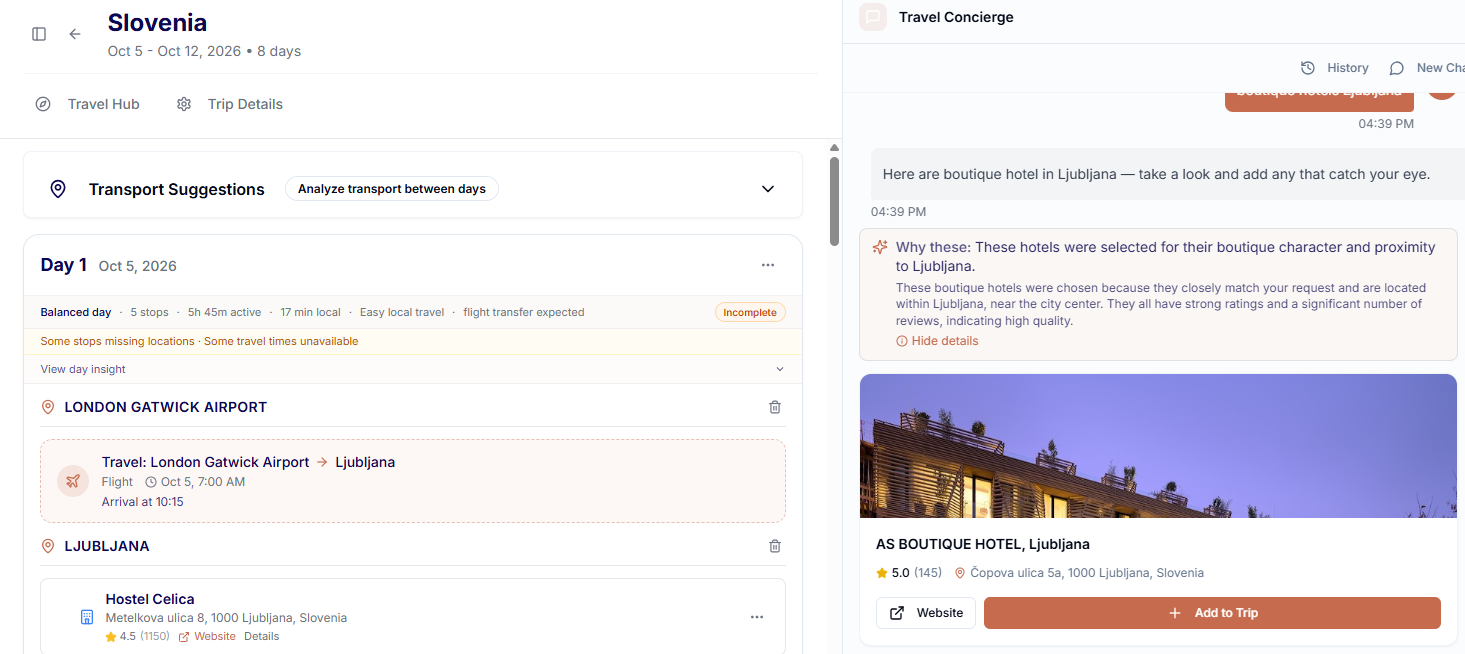
A user can add venues directly to a day, or ask a concierge chat to find something, for example, “a good restaurant for local food near the hotel.” Once an item is placed in the itinerary, a user can drag and drop to reorder items. Neither direct add nor the chat invents an itinerary item.
Every stop in an itinerary needs an accurate latitude and longitude for geographic routing to work. General purpose AI doesn’t reliably provide one. The Clever Pilgrim system pulls up to 15 real, Google-verified candidates every time, scores and filters them against the request, ranks what’s left with a consistent formula, and surfaces the top three to five with an explanation for why they were chosen. This same engine powers a clickable “sparkle” action on Destination Highlights once a destination has been added to a planning session. A deterministic tiebreak prevents the same query from returning a different order for no reason.
Adding or reordering itinerary items runs through validation and ordering logic. AI is excluded from this process to prevent silent corruption of the trip order.
4. Live Route Validation
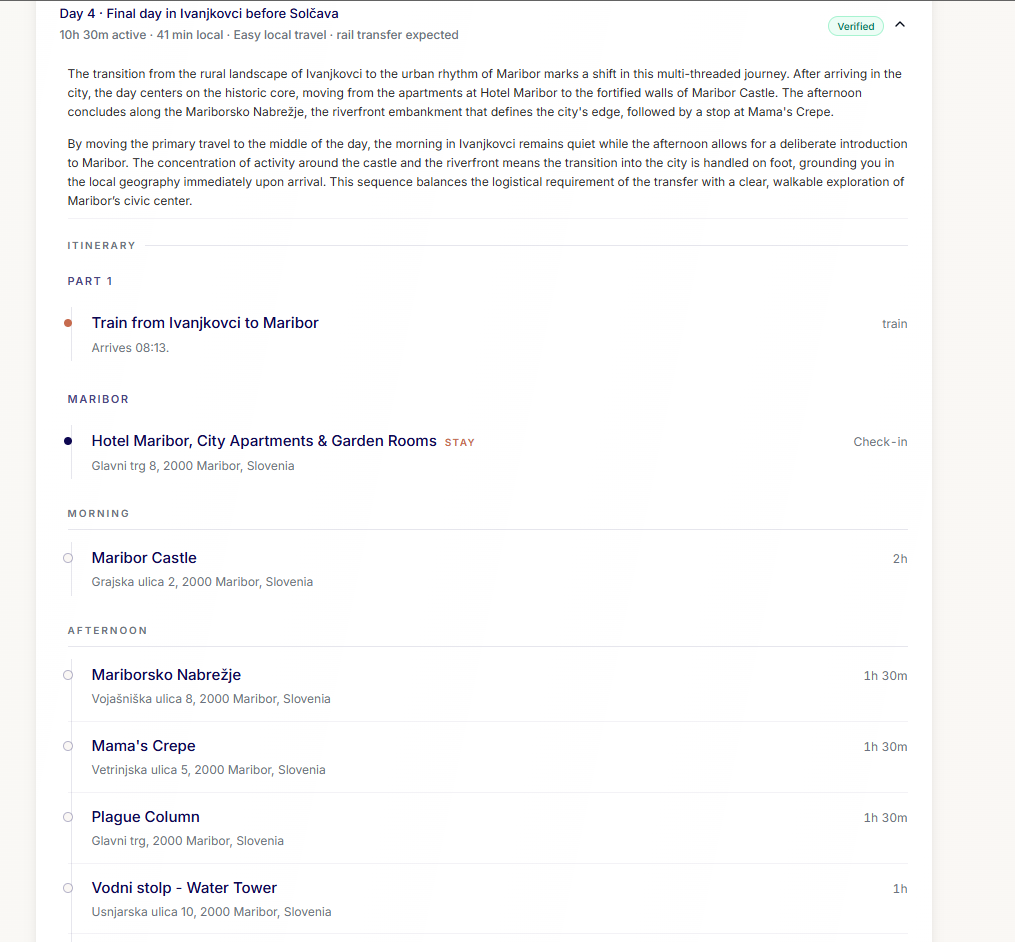
Every time an item is added, removed, or moved, the system recomputes real travel time and distance for the affected stops. This runs through the Google Routes API, rather than allowing an AI estimate like “that’s probably a 20-minute walk.” That accuracy is what lets each itinerary day show a verified local travel time, like “37 min local travel.” The same information surfaces again in the Travel Hub.
5. The Travel Hub
Once there’s a plan, the Travel Hub becomes the place to understand and prepare for it. In one place, a user gets:
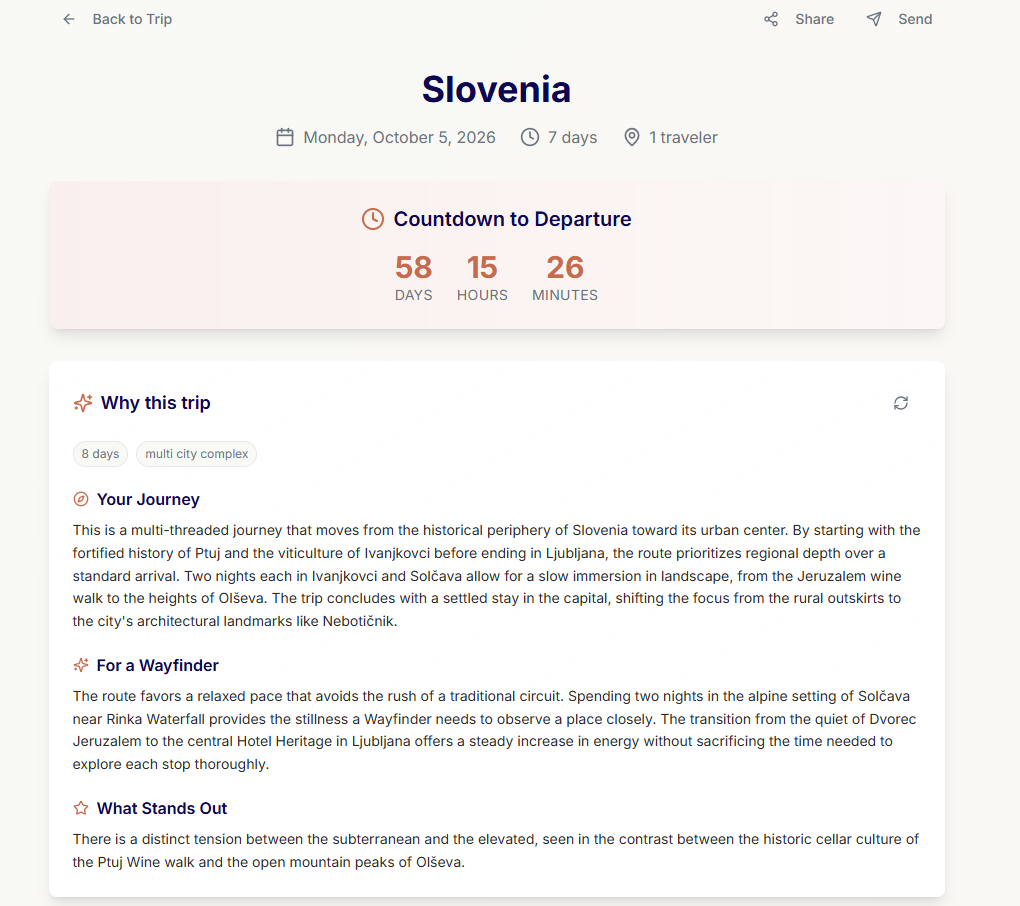
- A trip-level “Why this trip” hero, written for their specific route and traveler type
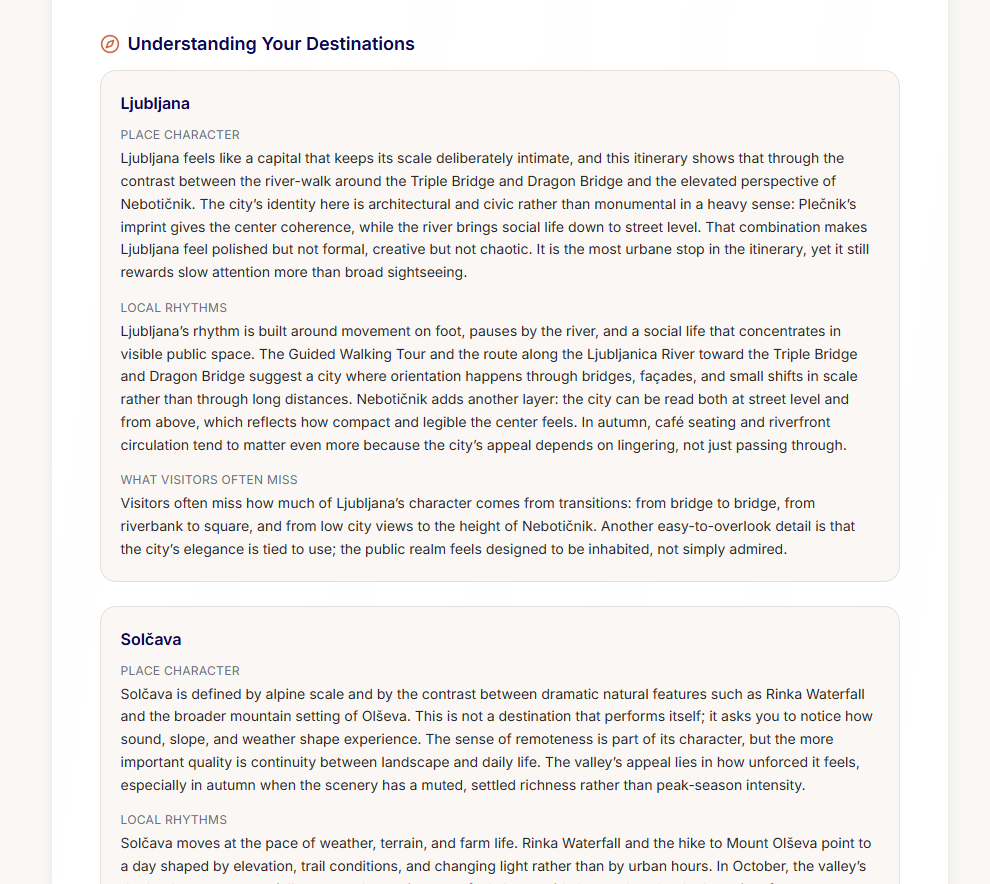
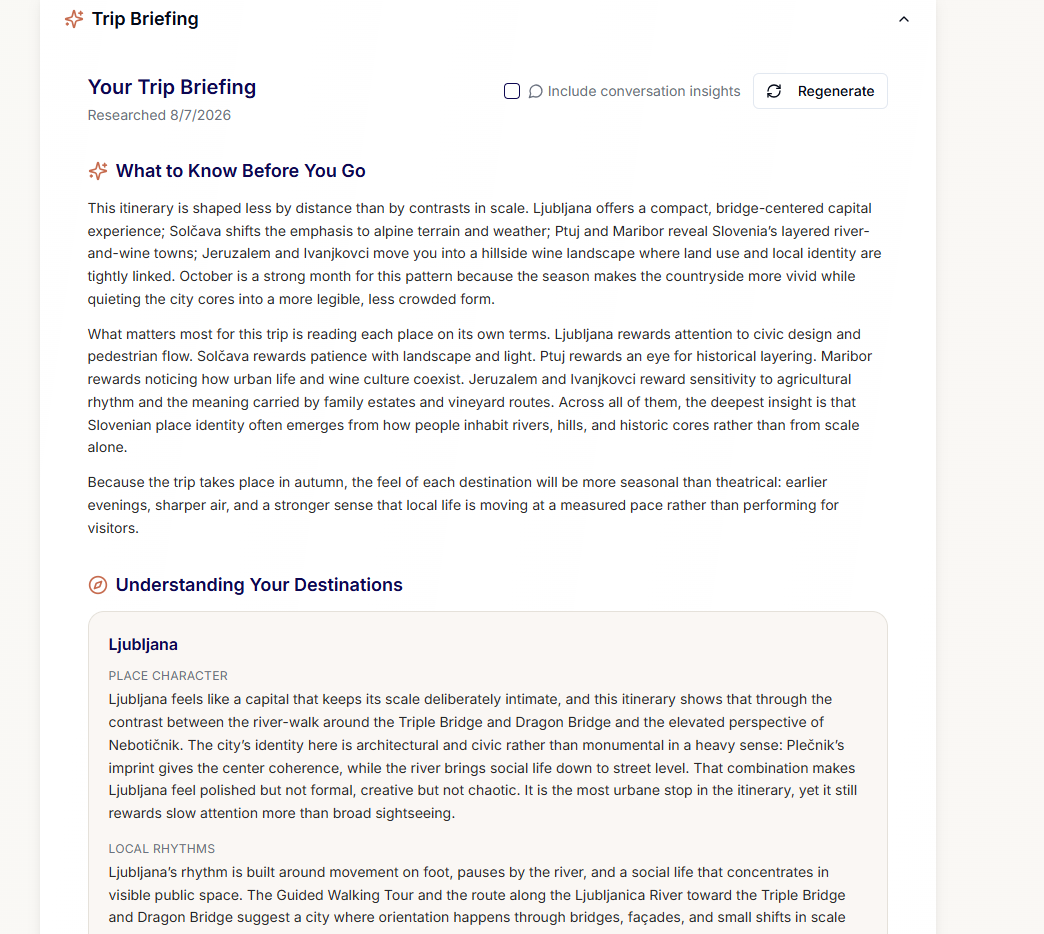
- A “Place Character” breakdown for each destination, tied to specifics of the itinerary (for example, in a large city, a neighborhood write-up may be generated based on trip activity or hotel location, not generic city copy)
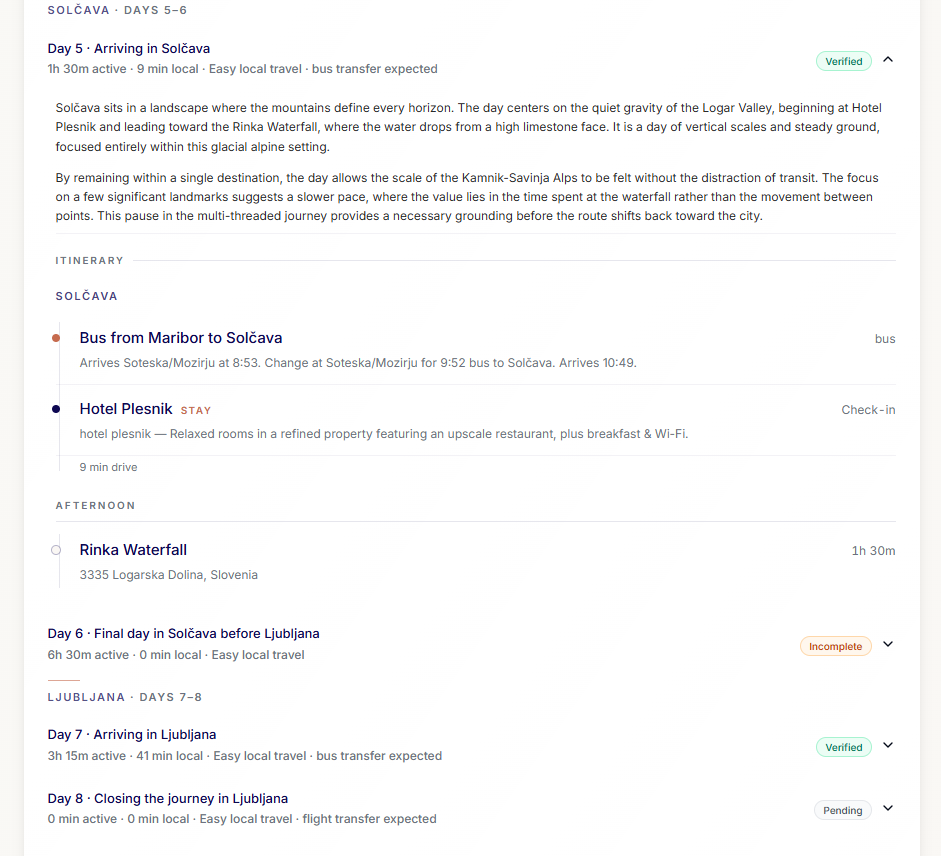
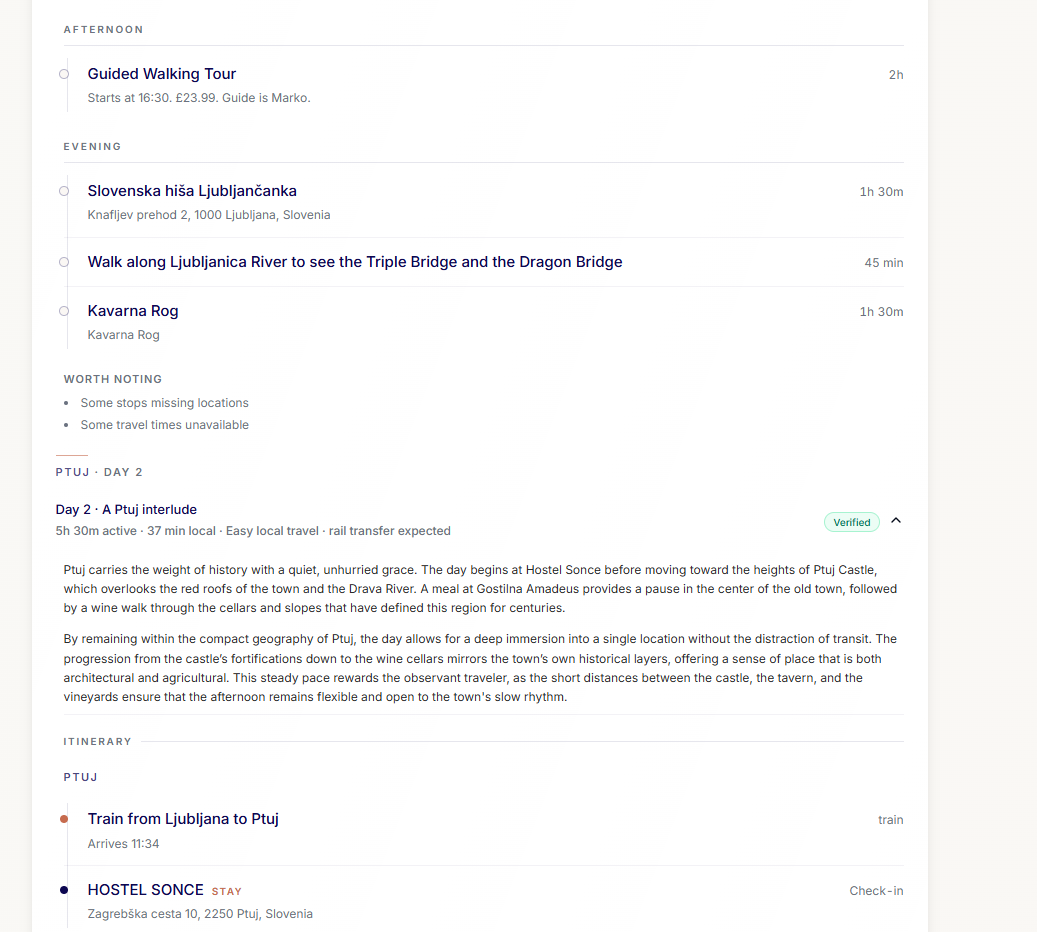
- A day-by-day narrative referencing the actual venues and sequence booked for that day, each tagged with one of four confidence levels describing how complete that day’s route data is, Verified, Partial, Incomplete, or Pending
- Cultural and practical intelligence (etiquette, plug types, payment norms) tied to the actual locations and actual travel dates
- Weather that shows historical/climatological averages until the trip dates approach, then switches to live forecasts
- A Trip Briefing that synthesizes all of the above into one narrative, with a research timestamp, mandatory sources, and manual regeneration (not a background job re-running on its own)
- A packing list and pre-trip checklist, generated per trip by an LLM, accounting for traveler type, pace, budget, dates, and per-destination weather, power, and currency context (two trips with different destinations or traveler types get materially different checklists, not the same list with the city name swapped in)
- Trip-level actions like share and export
6. Unlock
The free tier allows a user to plan a trip. Itinerary building is completely free. Destination and venue suggestions are not paywalled. Routing times between stops are included. A one-time Trip Unlock (Stripe-powered) adds the full Travel Hub, the Trip Briefing, export, and sharing. Payment is per trip, not a subscription.
None of this was hand-written by me. I don’t write code. I managed every step that turned this from an idea into a working product. I wrote the spec for each piece of behavior. I designed every screen and interaction. I tested every implementation.
I used ChatGPT for governance, planning, and review. I used Lovable’s AI editor for audits, implementation plans, and the implementation itself. My job was to manage those tools to build the product.
Deciding What Not to Build
To prevent feature creep during beta development, I evaluated proposed work against three questions: Does it improve user trust? Does it unblock the core planning loop? Does it materially improve launch readiness? Anything that failed to answer at least one of those questions affirmatively was deferred or omitted. Several interesting ideas, including live booking, vector search, route optimization, autonomous planning, and background monitoring, were not included in the beta launch product.
- Live booking. I deliberately excluded it to focus on planning quality before transaction execution.
- Vector search. I deferred it until real user behavior could justify the added complexity.
- Route optimization. I limited the launch scope to deterministic spatial validation rather than full optimization.
- Autonomous planning. I rejected it in favor of collaborative planning that keeps the user in control.
- Background monitoring. I chose on-demand travel intelligence instead of continuous monitoring, to keep operational cost predictable before product-market fit.
The Trust Architecture
The most important, repeatable decisions I had to make throughout the build involved what could be handled probabilistically by AI. Everything else required deterministic architecture to guarantee it was actually true. Ideas, prose, phrasing, and personalization can be probabilistic. Place identity, geography, trip state, and any claim about what was saved cannot be.
The clearest example is language, and it runs in both directions. A travel assistant that says “I’ve saved that” when it hasn’t isn’t just a bug. It’s a failure that undermines trust in the entire product. So I set a rule that the assistant cannot claim something is saved unless the part of the system responsible for saving confirms it, in that same turn. That rule is enforced structurally, not in a prompt. No “saved,” “noted,” or “updated” language is used unless the save actually happened. If only some fields were committed, it can only acknowledge those.
The reverse failure matters just as much, and it’s easier to miss because nothing looks broken. If the system writes something to the trip and never tells the user, that’s a silent write. The trip’s actual state now differs from what the user believes it to be. So the same rule runs the other way too. Every write is narrated by the assistant. Every commit gets acknowledged, every time, in the same turn it happens.
I called the combined rule the State Narration Authority Boundary, for consistent reference throughout the build. It requires that narration and actual system state match, in both directions, every time.
That’s a specification decision. It must be written down and enforced structurally before any code can implement it.
The principle of trust is present in every other part of the product that matters:
- Routing is computed, not estimated. Discussed elsewhere, travel time between stops comes from a real routing API, and only the affected legs recompute on change.
- Venue suggestions are real, not invented. Also discussed elsewhere, ranking and filtering run against actual Google-verified places, not AI responses. The personality-weighting component exists and is wired in, but is currently set to zero. That will be discussed further in the gaps section.
- Advisory content can’t be published without sources. The Trip Briefing requires citations for its advisory content. If Perplexity doesn’t return sources, the response doesn’t pass.
- Narrative content is grounded in the specific trip. In Travel Hub, the “Why this trip” hero, the “Place Character” write-ups, and the day narratives are tailored to the trip.
- The UI admits what it doesn’t know. When routing data for a day is incomplete, the product tags the day as “Incomplete.” The user is informed “1 day has incomplete travel data.”
- Adding and reordering run on validation, not AI. Adding or reordering a stop carries the greatest risk of silent corruption of the trip. It runs through deterministic validation only.
What I’m Looking For
I’m looking for Founding PM, AI Product Manager, or product roles at early-stage or founder-led companies. I’ve done that work solo on Clever Pilgrim, from spec to shipped product, and I’m ready to do it with people around me instead of alone. If your team needs someone who can own a problem end to end, I’d like to talk.
Part Two below goes deeper into build specifics. It covers a real build failure and the fix, a visual walkthrough of the shipped product, how I’ve approached growth without a budget, and a disclosure of gaps I’ve identified.
Every Role, One Person
Product, design, QA, and architecture all ran through one person on this build. Keeping the trust rules enforced was a continuous process of checking work against the set standard.
The clearest example is AI drift. This is a known failure mode in AI-assisted development, sometimes called context drift or context rot. As a build goes on, the AI loses track of rules established earlier in the project without ever being told to abandon them. Over the life of the project, I saw this pattern repeatedly. A rule correctly enforced one month could quietly stop being enforced later. Catching that drift meant noticing when behavior had slipped from a standard I’d set, then pushing the implementation back into line. That was a constant process, not a one-time governance decision.
Another trust problem in this build was memory. Early on, I learned that a multi-stage plan proposed by the AI editor would not survive its own execution. Any back-and-forth, confirmation, or testing before completion of the final stage risked the editor losing the plan. That is a serious risk for someone who doesn’t write code themselves. If the plan disappears two stages into a six-stage change, I’m left with code that only makes sense alongside the four stages that never got built, and no reliable way to ask the AI to audit what’s actually there against what was supposed to be there. Reconstructing the plan from that state costs time, costs build credits, and can end in spaghetti code and technical debt instead of the intended fix. I’ve hit this directly. I responded by forcing any multi-stage plan to be written and committed to a doc in the repo before execution started, not left to live in the conversation. That habit is the reason important execution plans exist as version-controlled documents rather than chat history.
The same discipline ran through the QA function. I asked the AI tooling to introspect its own codebase and tell me what was actually live. Every single one of those self-audits was not entirely reliable. I saw audits that misidentified which features were dormant versus shipped, missed entire live subsystems, and flagged dead code as a live risk. I caught those errors by cross-checking against actual screenshots, my own record of what was built but deferred, killed, or shipped, and observed behavior, not by trusting the tool’s account of its own work.
I also built a standing beta-launch QA checklist rather than relying on ad hoc testing or the AI’s own account of readiness. It included explicit invariants like no silent writes and no phantom acknowledgements as testable items. I also defined what constituted a successful beta test. Testers should be able to articulate what the paid unlock activates, should not describe it as “AI gating,” and should notice the effect within three seconds. I treated the trust invariants in that checklist as launch blockers. The app didn’t go live until they held.
I didn’t write the code myself. I was the product manager, the designer, the QA lead, the architect, and the one managing the AI tooling itself. Using AI tools to execute the code didn’t eliminate any of those roles. If anything, it made the judgment work more important, because the tool would confidently produce something that looked done. My job was to keep checking whether it actually was.
Learning It the Hard Way
I will highlight a few specific failures and issues, because they exemplify how my thinking changed over the life of the project. None of the processes now described throughout this case study existed initially: no architecture standards, no execution plans, no formal review. My first pass at this app leaned heavily on AI, without the trust and determinism I later realized was needed. The itinerary builder is the core functionality of the app. I realized that simply wiring up a front end to LLM API calls wasn’t going to result in the product I needed.
My first problem involved drag-and-drop functionality. Drag-and-drop reordering of itinerary items did not work reliably, and there were particular issues with inserting a transport leg (flight, train, drive, etc.). Transport would sometimes attach to the wrong stop or not attach between the target destinations. Multi-day destinations were also problematic. In that build version, the structure of the itinerary broke in unpredictable ways and was difficult to debug.
At first I investigated and attempted to patch the drag-and-drop logic, but that failed to increase the reliability. I was only able to solve the problem by finding the root cause, which was a flat table of itinerary items and missing geographic data. Destinations, hotels, meals, activities, and transport lived in the same table with a “type” field. That had seemed reasonable during the first pass, but the result was a system that lacked the structural knowledge to treat a transport leg differently than a destination.
The fix required redesigning the data model, not more iterations of the drag-and-drop system:
- Transport needed to be a structured object with a verified origin and destination, not just a row of type “transport.”
- Destinations required canonical latitude and longitude and a system for matching user destination intent with those coordinates.
- Days needed to be organized into day segments attached to a destination, not a flat, ordered list.
These fixes improved the reliability of both transport insertion and drag-and-drop reordering. Along with a system I implemented later to require itinerary items to have canonical coordinates, these architectural improvements provided a foundation for trustworthy computation of not only travel legs, but movement between stops.
The app evolved through almost 3,000 recorded edit iterations since December 2024, with greater improvement coming as I discovered what my vision required architecturally and as I tightened my methodology. Many of those iterations were small, but a second problem involving trust and determinism is worth highlighting here. The system behind the chat needed to reliably track and commit data, and it needed to be honest with the user about what was recorded and what was not. I identified two primary situations where the chat must not be misleading to the user. First, it must never indicate data was saved unless it actually was. And second, it must not silently write data without acknowledgment to the user that it was being saved.
My early implementation instructed an LLM to avoid words like “saved,” “noted,” “updated,” unless the system verified data as written to the appropriate table. I soon discovered that this kind of heuristic fix was unpredictable and wouldn’t reliably prevent responses that could be interpreted as persistence.
I also realized there was a tension in my requirements. I wanted a chat that allowed the system to reliably send important data to the appropriate field in the backend, but one that didn’t sound like a machine when it responded to users. I separated the two problems instead of solving them with one mechanism. Every turn was given a type. The chat could then answer, ask a clarifying question, propose a change, or confirm a change already committed. The type of turn provided the guardrails for the assistant, preventing silent writes and false claims of persistence. The composer then could respond naturally based on the turn’s category.
Building a chat assistant involving determinism and trust was challenging, sometimes made more difficult by the AI tool’s inclination to propose regex fixes. That showed up often in chat response bugs. I learned early that a regex fix is sub-optimal. Every regex fix would target a narrow problem and leave innumerable edge cases. In a chat function where the user might say any combination of words, regex was not the answer.
I began to reject regex solutions and push for structural ones, and I created a formal rejection rule in the architectural standards (informally, I referred to it as the “band-aid smell” test). When the AI tool’s main fix for any bug was to expand the list of phrases to detect or to add regex to cover a pattern, I rejected it and demanded a structural solution.
As the project progressed, my understanding of the tools and architectural requirements improved, and I had the discipline to create and force AI tool compliance with written plans and guidelines, reject band-aid fixes, and define and stay within launch scope. I intentionally deferred several features for beta launch, including vector search, retrieval orchestration, and background monitoring.
The Product, In Practice
These are from a real, multi-city Slovenia trip built in the app.
Getting to Users
I don’t have a marketing budget, so I created a weekly marketing and customer acquisition plan exclusively focused on content-led, organic growth. The plan is a weekly rhythm of writing and social media content. Long form writing about travel philosophy and broader issues is ticketed for the Clever Pilgrim Journal, and content about planning, specific trip itineraries, destinations, and other practical themes is slated for the Clever Pilgrim blog. Short-form videos are created for TikTok, Instagram, and YouTube Shorts. Short posts in Clever Pilgrim voice are uploaded to X.com. All content streams target signups and, eventually, trip unlocks. I also did a structured competitive teardown of Wanderlog, TripIt, and Mindtrip to assess where a solo product could actually win a niche. The teardown made clear that trying to out-build companies with venture funding and full teams isn’t a fight worth having. The product does not have meaningful traction yet, but marketing and customer acquisition efforts reflect the same discipline employed in the rest of the project.
Honest Gaps
I’d rather state these directly than have someone find them first.
- The app is live, but it’s early days. Clever Pilgrim went live in July 2026 and is currently in Founders Beta. Payments, legal, and operational infrastructure are in place. The app has no users or revenue yet.
- Personality-based ranking for venue suggestions is built but not active. The destination-suggestion system uses personality signals to shape what gets generated. That is live and user-visible. Personality data can influence how venue candidates (hotels, restaurants, attractions) are ranked and filtered. That architecture is built and wired into the live ranking and filtering system, but it is currently set to zero.
- A related curation and deduplication layer to remove near-duplicate suggestions and improve diversity in results is also built and passing tests, but not yet wired into the production chat flow.
- No cross-functional collaboration evidence. My “team” was essentially myself and AI tools. I did not work with engineers, designers, or other PMs.
- I built the app with AI-assisted implementation, not hand-written code. I am not an engineer. A few habits closed that gap. I frequently asked the AI tool to explain its own solution in a language a non-technical product owner could understand. I asked for assessments of the blast radius of each significant implementation plan. I also understood that the desired architecture probably had existing, real world solutions, so I asked the tools whether the proposed implementation followed best practices, or was just the fastest thing that would ship. I did not, however, write code.
- No formal test infrastructure. Testing of implementations involved static audits by AI tools, combined with runtime tests done by hand. For each implementation plan, I asked for a test suite from the AI tools for me to work through. For launch, I generated a launch QA document and worked through that manually. I do not have an automated test suite or CI/CD pipeline. This is a real limitation relative to how a funded or enterprise team would operate, and one I’d address differently with a team and budget behind me.
Next
See the live product surface, or read the short version of my background.